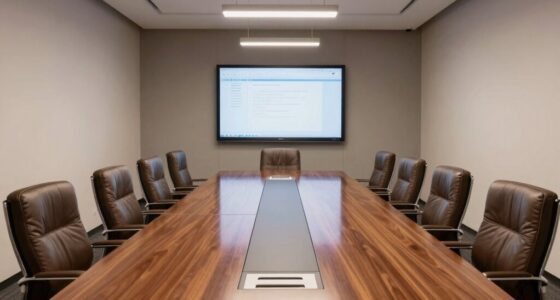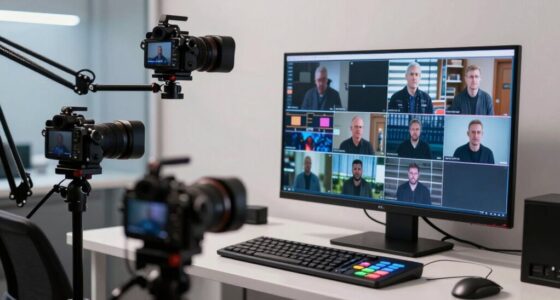
To design a better hybrid meeting room, invest in quality audio-visual tech like high-quality microphones, cameras, and interactive displays to guarantee clear communication. Choose ergonomic, adjustable furniture for comfort and flexibility, while positioning screens at eye level for remote participants. Incorporate acoustic treatments to reduce background noise and create an inclusive environment that promotes engagement for everyone. By combining innovative tech with adaptable furniture and thoughtful layout, you’ll foster seamless collaboration—explore further to open even more effective strategies.

Get the little things that make your day delivered free with Prime
- Fast, free delivery on millions of items
- Prime Video, Amazon Music and more included
- Member-only deals all year
Key Takeaways
- Equip the room with high-quality microphones, cameras, and interactive displays for seamless remote and in-person interaction.
- Use adjustable ergonomic furniture and flexible layouts to accommodate various meeting formats and team sizes.
- Position screens at eye level and ensure clear sightlines for all participants, enhancing visual engagement.
- Incorporate acoustic treatments and sound pickup devices to minimize background noise and improve audio clarity.
- Design the space for versatility, enabling easy transition between collaborative, focused, and social meeting styles.

As remote work becomes increasingly common, designing hybrid meeting rooms that facilitate seamless collaboration is more important than ever. You need a space that bridges the gap between in-office and remote participants, making everyone feel equally engaged. The foundation of this setup is investing in the right collaborative technology. High-quality microphones, speakers, and cameras ensure clear audio and video, so remote team members can participate without frustration. Consider video conferencing systems with multiple cameras that can switch views dynamically, giving remote participants a sense of presence and making it easier for everyone to follow the conversation. Screen sharing tools and interactive displays also play a *crucial* role, allowing everyone to contribute and visualize ideas in real time. These technological enhancements keep the meeting flowing smoothly and prevent remote attendees from feeling left out or disconnected.
Equally important is the choice of ergonomic furniture. Your goal should be to create a comfortable environment that promotes focus and reduces fatigue, especially during longer meetings. Invest in adjustable chairs that support good posture and desks that accommodate various working styles. For in-room participants, seating arrangements should facilitate eye contact and easy communication, while remote participants should feel just as involved as those physically present. Consider movable furniture options to adapt the space for different meeting types, from collaborative brainstorming sessions to focused discussions. Proper lighting, both natural and artificial, can improve comfort and reduce eye strain, which is *essential* for maintaining concentration and productivity.
Designing a hybrid meeting room isn’t just about technology and furniture; it’s about creating an environment that fosters inclusivity. Make *certain* that the layout allows remote participants to see and hear everything clearly, with screens positioned at eye level and microphones that pick up voices from all directions. Use acoustic treatments to minimize background noise, ensuring clarity for everyone. Incorporate flexible spaces that can be adjusted to suit different group sizes and activities, so the room remains versatile and functional. By thoughtfully combining collaborative technology with ergonomic furniture, you set the stage for more natural and effective interactions. This approach not only improves the quality of your meetings but also boosts team morale and collaboration, regardless of where everyone is located.
high quality conference microphone
As an affiliate, we earn on qualifying purchases.
As an affiliate, we earn on qualifying purchases.
Frequently Asked Questions
How Can I Ensure All Team Members Feel Equally Included?
You can guarantee all team members feel equally included by designing the space for inclusive seating, so everyone can see and hear clearly. Use technology like cameras and microphones to promote equal participation, allowing remote members to contribute seamlessly. Encourage active facilitation to involve quieter voices and create a culture of openness. This approach helps foster connection, ensuring every team member feels valued, heard, and engaged during meetings.
What Are the Best Tools for Hybrid Meeting Room Collaboration?
You should prioritize tools like virtual breakout rooms and interactive whiteboards for hybrid meetings. Did you know 85% of teams report increased engagement with these tools? Virtual breakout rooms foster small-group collaboration, while interactive whiteboards enhance real-time idea sharing. These tools help bridge physical gaps, making meetings more interactive and inclusive. Incorporate them into your setup to boost participation and streamline teamwork, no matter where your team is located.
How Do I Manage Technical Issues During Hybrid Meetings?
To manage technical issues during hybrid meetings, stay proactive by testing your virtual breakout and screen sharing features beforehand. Keep a troubleshooting guide handy and assign a tech support person to assist participants if problems arise. During the meeting, stay calm, communicate clearly, and quickly switch to alternative methods, like sharing a link or using chat. Promptly addressing issues guarantees your hybrid meeting runs smoothly and keeps everyone engaged.
What Is the Ideal Room Size for Hybrid Team Meetings?
Imagine a room where every voice is clear, and conversations flow effortlessly. The ideal size for hybrid team meetings is around 300 to 500 square feet, providing enough space for good room acoustics and comfortable furniture layout. This size guarantees participants aren’t cramped, sound doesn’t echo, and everyone has a designated spot. It fosters engagement, making collaboration seamless whether team members are present physically or virtually.
How Can I Optimize Audio Quality for Remote Participants?
You can enhance audio quality by ensuring sound insulation around the room to reduce echo and outside noise. Place high-quality microphones strategically, such as ceiling mics or tablepods, to capture voices clearly from different angles. Test microphone placement beforehand, adjusting for ideal pickup and minimal background noise. This setup helps remote participants hear everyone clearly, creating a seamless and engaging meeting experience for all.
interactive display for meeting rooms
As an affiliate, we earn on qualifying purchases.
As an affiliate, we earn on qualifying purchases.
Conclusion
By embracing these design tips, you create a meeting space that truly caters to your hybrid team’s needs. Remember, even in the age of holograms, good audio and thoughtful layout remain king. Don’t fall into the trap of thinking tech alone solves everything; a well-designed room fosters genuine collaboration and keeps everyone engaged. So, take a page from the past and craft a space that’s functional, inclusive, and ready for the future—without needing a DeLorean to get there.
video conferencing camera system
As an affiliate, we earn on qualifying purchases.
As an affiliate, we earn on qualifying purchases.
acoustic treatment panels for office
As an affiliate, we earn on qualifying purchases.
As an affiliate, we earn on qualifying purchases.
NFL season / tailgating Picks
team gear
As an affiliate, we earn on qualifying purchases.