
Ergonomic laptop stands raise your screen to eye level so you stop hunching over your desk, and the differences between models come down to height range, stability, rotation, and portability. After comparing 14 popular options, the Besign LSX7 stands out as my best overall pick for its rare combination of a 360° rotating base, adjustable height, and a foldable design that travels well. The Nulaxy dual-foldable riser is the stronger choice if raw height range and heat ventilation matter most, while the Amazon Basics stand delivers the best budget-friendly balance of adjustability and build quality. The core tradeoff in this category: fully adjustable and rotating stands tend to be bulkier, while ultra-portable folding models usually sacrifice height and rigidity. Read on for the full breakdown of which stand fits your desk, your laptop size, and your posture goals.

Get the little things that make your day delivered free with Prime
- Fast, free delivery on millions of items
- Prime Video, Amazon Music and more included
- Member-only deals all year
Key Takeaways
- Rotating bases (amazon.com/dp/B0C7FQ95P5?tag=rebelburst-20&ascsubtag=dc-612354″ target=”_blank” rel=”nofollow sponsored noopener”>MOALLIA N86, Urmust, Besign LSX7) were the biggest differentiator for shared desks and multi-monitor setups — fixed stands like the Lamicall can’t pivot to face a client or a second seat.
- Telescopic and height-adjustable models (Tounee, Lifelong 20-inch riser) reached true eye-level height, but several budget ‘adjustable’ stands only shifted a few centimeters, which barely changes neck angle.
- Portability and stability worked against each other throughout the lineup: the foldable Riwuct and LOXP packed flat, while the sturdiest options felt like permanent desk fixtures.
- Detachable two-piece designs like the Besign LS03 and the Amazon Basics stand offered the best value per dollar, even though they give up rotation.
- Weight capacity and device-size limits varied sharply — most stands capped at 15.6 or 17 inches, so 17-inch-plus laptop owners had only three viable options (Urmust, Tounee, Lamicall).
| MOALLIA N86 360 Rotating Laptop Stand for Desk with Locking Knobs, Silver |  | Best for Screen Sharing | Material: Aluminum alloy | Rotation: 360° | Dimensions: 11.42 x 2.36 x 1.87 inches | VIEW LATEST PRICE | See Our Full Breakdown |
| Urmust 360° Rotating Laptop Stand for 10-17 inch Devices |  | Best Heavy-Duty Pick | Compatibility: 10-17 inch laptops | Rotation: 360° | Weight Capacity: 22 lbs | VIEW LATEST PRICE | See Our Full Breakdown |
| Tounee Telescopic Laptop Stand with 360° Swivel Base, Adjustable Height, Portable Riser for Ergonomic Posture, Gray |  | Best for Sit-Stand Work | Height Range: 2.1 to 21 inches | Maximum Load: 22 lbs | Material: Aluminum alloy | VIEW LATEST PRICE | See Our Full Breakdown |
| Tonmom Laptop Stand for Desk, Adjustable Laptop Riser, Black |  | Best Budget Travel Pick | Height Adjustment: 2.78 to 6.5 inches | Weight: 0.53 pounds | Folded Dimensions: 10.5 x 1.96 x 0.68 inches | VIEW LATEST PRICE | See Our Full Breakdown |
| Riwuct Aluminum Alloy Laptop Stand for Desk, Foldable Laptop Riser Holder |  | Best Value for Home Desks | Material: Aluminum alloy | Max Height: 7.48 inches | Weight Capacity: 8.8 lbs | VIEW LATEST PRICE | See Our Full Breakdown |
| Besign LSX7 Laptop Stand with 360° Rotating Base |  | Best for Collaborative Workspaces | Compatibility: 10-15.6 inch laptops | Material: Metal | Support Weight: 13 lbs | VIEW LATEST PRICE | See Our Full Breakdown |
| LOXP Adjustable Laptop Stand for Desk |  | Best Value for Travelers | Max Load Capacity: 15.4 lbs (7 kg) | Supported Laptop Size: Up to 15.6 inches | Material: Sturdy metal | VIEW LATEST PRICE | See Our Full Breakdown |
| Nulaxy Ergonomic Adjustable Laptop Stand |  | Best Stability Pick | Supported Devices: 10-16 inch laptops | Maximum Load: 22 lbs (10 kg) | Stability Mechanism: Dual-rod support | VIEW LATEST PRICE | See Our Full Breakdown |
| Lifelong Aluminum Adjustable Laptop Stand, 20″ Riser | 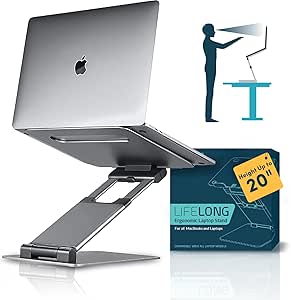 | Best for Standing Desk Use | Material: Aluminum | Maximum Height: 20 inches | Arm Extension: 13 inches | VIEW LATEST PRICE | See Our Full Breakdown |
| Besign LS03 Aluminum Laptop Stand |  | Best Minimalist Desk Pick | Compatibility: 10-15.6 inch laptops | Material: Aluminum alloy | Maximum Support Weight: 8.8 lbs | VIEW LATEST PRICE | See Our Full Breakdown |
| Lamicall Aluminum Laptop Stand for 10-17.3 inch Laptops |  | Best for Large Laptops | Compatibility: 10″ to 17.3″ laptops | Material: Aluminum alloy | Base: Large, heavy, stable | VIEW LATEST PRICE | See Our Full Breakdown |
| Adjustable Laptop Stand for Desk, Metal Laptop Riser Holder |  | Best Heavy-Duty Value | Support Weight: 17.6 lbs (8kg) | Compatibility: 10-15.6 inch laptops | Material: Metal | VIEW LATEST PRICE | See Our Full Breakdown |
| Laptop Stand for Desk, Adjustable Laptop Riser Holder |  | Best Budget Ergonomics | Max Support Weight: 17.6 lbs | Material: Sturdy metal | Compatibility: 10-15.6 inch laptops | VIEW LATEST PRICE | See Our Full Breakdown |
| Amazon Basics Sturdy and Portable Ergonomic Laptop Stand for Desk |  | Best Portable Pick | Height Adjustment: Up to 7 inches | Supported Devices: Laptops and tablets 10 to 15.6 inches | Material: Lightweight, rust-resistant aluminum | VIEW LATEST PRICE | See Our Full Breakdown |
| ergonomic laptop stand | Material | Compatibility | Foldable |
|---|---|---|---|
| MOALLIA N86 360 Rotating Lapto | Aluminum alloy | Laptops 11-16 inches (MacBook, Surface, Dell, HP, Chromebook) | Yes |
| Urmust 360° Rotating Laptop St | Metal | 10-17 inch laptops | — |
| Tounee Telescopic Laptop Stand | Aluminum alloy | Laptops 10-17 inches | — |
| Tonmom Laptop Stand for Desk | — | Laptops 10-15.6 inches | — |
| Riwuct Aluminum Alloy Laptop S | Aluminum alloy | — | Yes |
| Besign LSX7 Laptop Stand with | Metal | 10-15.6 inch laptops | — |
| LOXP Adjustable Laptop Stand f | Sturdy metal | — | Yes |
| Nulaxy Ergonomic Adjustable La | — | — | Yes |
| Lifelong Aluminum Adjustable L | Aluminum | Laptops 10-17 inches, tablets | Yes |
| Besign LS03 Aluminum Laptop St | Aluminum alloy | 10-15.6 inch laptops | — |
| Lamicall Aluminum Laptop Stand | Aluminum alloy | 10" to 17.3" laptops | — |
| Adjustable Laptop Stand for De | Metal | 10-15.6 inch laptops | Yes |
| Laptop Stand for Desk | Sturdy metal | 10-15.6 inch laptops | Yes |
| Amazon Basics Sturdy and Porta | Lightweight, rust-resistant aluminum | — | — |
More Details on Our Top Picks
MOALLIA N86 360 Rotating Laptop Stand for Desk with Locking Knobs, Silver
What sets the MOALLIA N86 apart from the rest of this lineup is its 360° rotating base paired with genuine portability. Where the Tounee telescopic stand reaches higher and the Tonmom sits lower and lighter, this model hits a middle ground: enough height adjustability for meaningful posture relief, plus a swivel that makes it the pick for anyone who regularly turns a screen toward a client, colleague, or classmate. The aluminum build dissipates heat well and folds flat into a bag.
The tradeoff is friction in the adjustment process. Locking knobs must be loosened and retightened by hand, and the laptop should come off before you reposition anything — a slower workflow than the one-motion adjustments on the Tonmom. Laptops thicker than 0.8 inches also won’t sit vertically in the cradle, which rules out chunky gaming machines.
Pros:- 360° rotation makes collaboration and screen sharing effortless
- Folds flat and weighs just 2 pounds for travel
- Aluminum alloy construction doubles as a heat sink
- Height and angle adjust for genuine ergonomic positioning
Cons:- Laptop must be removed before adjusting the locking screws
- 0.8-inch thickness limit excludes thicker gaming laptops
- Knob-based adjustments are slower than lever or telescopic designs
Best for: Consultants, designers, and students who frequently share their screen across a desk and need a stand that travels
Not ideal for: Gamers or users with thick laptops over 0.8 inches, since the cradle won’t accommodate them
- Material:Aluminum alloy
- Rotation:360°
- Dimensions:11.42 x 2.36 x 1.87 inches
- Weight:2 pounds
- Compatibility:Laptops 11-16 inches (MacBook, Surface, Dell, HP, Chromebook)
- Foldable:Yes
- Max Device Thickness:0.8 inches
Our verdict“This is the stand for people whose workday revolves around turning a screen toward someone else without unplugging or repositioning the whole setup.”
Urmust 360° Rotating Laptop Stand for 10-17 inch Devices
If your laptop is a 17-inch workstation that weighs as much as a hardcover dictionary, most stands in this roundup flinch — the Riwuct tops out at 8.8 lbs, and the Tonmom won’t even accept a machine that size. The Urmust holds up to 22 lbs while covering 10 to 17 inch devices, making it the safest bet here for gaming rigs and mobile workstations. Its all-metal vented construction pulls heat away from machines that run hot under load, and the 360° rotation adds the same collaboration convenience as the MOALLIA N86, but with far more headroom.
That strength comes at a cost: the heavy base eats desk real estate, and like the MOALLIA, you have to lift the laptop off before changing height or angle. This is a desk-bound tool, not a travel companion.
Pros:- 22 lb weight capacity handles heavy gaming and workstation laptops
- All-metal vented design keeps powerful machines cool
- Ergonomic height range reduces neck and shoulder strain
- 360° rotation simplifies showing your screen to others
Cons:- Bulky, heavy base dominates smaller desks
- Laptop must be removed before adjusting height or angle
- Not practical to move between locations
Best for: Owners of heavy 16-17 inch gaming laptops or workstations who need a stable, heat-friendly desk stand
Not ideal for: Anyone with limited desk space or a compact 13-inch laptop that doesn’t need this much structure
- Compatibility:10-17 inch laptops
- Rotation:360°
- Weight Capacity:22 lbs
- Material:Metal
- Height Adjustment:Multiple settings
- Cooling:All-metal construction with vents
Our verdict“Buy this if your laptop is too big or heavy for the lighter stands in this guide; skip it if you value desk space over capacity.”
Tounee Telescopic Laptop Stand with 360° Swivel Base, Adjustable Height, Portable Riser for Ergonomic Posture, Gray
No other stand in this batch comes close to the Tounee’s 2.1 to 21 inch height range. That range is the difference between a laptop riser and a legitimate sit-stand tool: the Urmust and MOALLIA offer modest height bumps, but the Tounee can raise a screen to eye level while you’re standing, which is the whole point of an ergonomic upgrade. The telescopic column also holds 22 lbs, matching the Urmust’s capacity in a slimmer footprint.
Realism is required, though. At full extension, a tall stand with a laptop on top inevitably introduces some wobble, and the base takes real force to rotate — unlike the smooth swivel on the MOALLIA. It’s also larger when deployed than compact risers like the Tonmom, so tiny desks will feel crowded.
Pros:- 21-inch maximum height enables true standing work
- Telescopic adjustment covers a huge ergonomic range
- 22 lb load capacity supports large laptops
- Folds down for storage when not in use
Cons:- Full-height extension can feel less stable
- Base requires noticeable force to rotate
- Footprint is too large for very small desks
Best for: Home-office workers who want to alternate between sitting and standing without buying a full standing desk
Not ideal for: Travelers and commuters — the extended form factor and rotating base make it bulkier than fold-flat risers
- Height Range:2.1 to 21 inches
- Maximum Load:22 lbs
- Material:Aluminum alloy
- Base Rotation:360°
- Compatibility:Laptops 10-17 inches
- Color:Gray
Our verdict“This is the closest a laptop stand gets to a standing desk replacement, and the only pick here for people serious about alternating postures.”
Tonmom Laptop Stand for Desk, Adjustable Laptop Riser, Black
At 0.53 pounds and under an inch thick when folded, the Tonmom is the featherweight of this lineup — the MOALLIA weighs nearly four times as much. For anyone whose stand lives in a backpack beside the laptop it serves, that difference matters more than any spec sheet. It still delivers a usable 2.78 to 6.5 inch lift, enough to raise the screen and take the sharp angle off your neck during long café or airport sessions, and anti-slip pads keep it planted on slick tables.
The compromises are the flip side of the weight savings. Unlike the aluminum Riwuct or Urmust, there’s no ventilated metal structure to passively cool your machine, and the 15.6 inch size cap excludes larger laptops entirely. Thick chassis may also sit awkwardly in the cradle.
Pros:- Weighs just 0.53 pounds — the most portable option here
- Folds to under an inch thick for easy packing
- Anti-slip pads keep the laptop stable on any surface
- Affordable entry point for ergonomic upgrades
Cons:- No built-in cooling or ventilated structure
- Capped at 15.6 inch laptops
- Maximum height of 6.5 inches limits ergonomic range
Best for: Students, digital nomads, and hybrid workers who need posture relief on the go at a low price
Not ideal for: Owners of 16-inch-plus laptops or anyone wanting significant height lift for standing work
- Height Adjustment:2.78 to 6.5 inches
- Weight:0.53 pounds
- Folded Dimensions:10.5 x 1.96 x 0.68 inches
- Compatibility:Laptops 10-15.6 inches
- Color:Black
Our verdict“The pick when weight and price matter more than height or cooling — perfect for a bag, underpowered for a permanent desk setup.”
Riwuct Aluminum Alloy Laptop Stand for Desk, Foldable Laptop Riser Holder
The Riwuct balances price, height, and build quality better than anything else in this batch for a fixed desk setup. Its 7.48 inch maximum lift exceeds the Tonmom’s ceiling for a more comfortable viewing angle, the aluminum body provides the same passive cooling as pricier options like the MOALLIA, and it folds for occasional transport. For most people with a 10 to 16 inch laptop and an external keyboard, this covers the ergonomic basics without paying for features like the Tounee’s standing-height range or the Urmust’s 22 lb capacity.
Those capacities are also the ceiling here: at 8.8 lbs, heavier machines are off the table, and the two-armed cradle can feel less planted with larger 16 inch laptops. Typing directly on the raised keyboard is bouncy by design — plan on an external keyboard, as with any riser this tall.
Pros:- 7.48 inch lift is higher than most comparably priced risers
- Aluminum construction with ventilation keeps laptops cool
- Folds flat for storage or occasional travel
- Non-slip pads provide solid stability on standard desks
Cons:- 8.8 lb weight capacity excludes heavy gaming laptops
- Two-arm design is less stable with larger 16 inch machines
- Requires an external keyboard for comfortable typing
Best for: Remote workers with standard 13-15 inch laptops who want a sturdy, cooling-friendly desk stand at a mid-range price
Not ideal for: Owners of heavy gaming laptops or anyone unwilling to pair the stand with an external keyboard
- Material:Aluminum alloy
- Max Height:7.48 inches
- Weight Capacity:8.8 lbs
- Supported Laptop Size:10 to 16 inches
- Foldable:Yes
- Color:Silver
Our verdict“The sensible default for a typical home desk: enough height, enough cooling, and enough stability without paying for capacity you won’t use.”
Besign LSX7 Laptop Stand with 360° Rotating Base
Sometimes the most useful ergonomic feature isn’t height — it’s the ability to swivel your screen toward a colleague without lifting the laptop. The Besign LSX7 stands out for its 360° rotating base, something the Nulaxy stand below can’t match. Compared with the Besign LS03, it trades the lighter aluminum build for sturdier metal and a higher 13 lb weight limit, which pays off if you use a heavier work machine. Height and angle adjustment covers the ergonomic basics, and open metal framing keeps airflow decent. The tradeoff: this is a desk-bound design. It folds, but it’s bulkier than the LOXP stand and less pleasant to carry daily. Rubber grips also look like the first part to wear out.
Pros:- 360° rotating base makes screen sharing effortless
- Sturdy metal build supports up to 13 lbs
- Independent height and angle adjustment for proper ergonomics
- Open design provides good ventilation
Cons:- Bulkier and heavier than truly portable competitors
- Rubber grips could wear down over time
Best for: Desk workers who frequently share their screen in meetings or pair-program and need quick rotation
Not ideal for: Commuters and travelers — it’s heavier and bulkier than dedicated portable stands like the LOXP
- Compatibility:10-15.6 inch laptops
- Material:Metal
- Support Weight:13 lbs
- Rotation:360° rotating base
- Adjustability:Height and angle adjustable
- Color:Black
Our verdict“This pick makes the most sense for desk-based workers who rotate their screen toward others several times a day.”
LOXP Adjustable Laptop Stand for Desk
For buyers who want adjustability without paying a premium, the LOXP hits a sweet spot: height and angle customization, a 15.4 lb load rating, and a foldable frame that slips into a bag. Compared with the Lifelong Aluminum stand, it gives up reach — it can’t double as a standing-desk riser — but it’s far more stable on a normal desk. The enhanced ventilation design matters for anyone running a warm machine, and non-slip pads keep the laptop planted during typing. The honest limitation is size: it caps at 15.6 inches, so 16- or 17-inch laptop owners should look at the Nulaxy or Lifelong instead. If your laptop fits, though, this is one of the strongest price-to-feature ratios in the lineup.
Pros:- Foldable and lightweight for genuine portability
- 15.4 lb load capacity handles heavier laptops
- Enhanced ventilation keeps thermals in check
- Non-slip pads prevent sliding during typing
Cons:- Only supports laptops up to 15.6 inches
- Not sturdy enough for very heavy gaming rigs or docked setups
Best for: Students and remote workers on a budget who carry their stand between home, class, and café
Not ideal for: Owners of 16-inch or larger laptops — the size ceiling rules those devices out entirely
- Max Load Capacity:15.4 lbs (7 kg)
- Supported Laptop Size:Up to 15.6 inches
- Material:Sturdy metal
- Foldable:Yes
- Heat Dissipation:Enhanced ventilation design
- Adjustability:Height and angle adjustable
Our verdict“A budget-friendly pick for people whose 15.6-inch-or-smaller laptop travels with them every day.”
Nulaxy Ergonomic Adjustable Laptop Stand
Nothing undermines an ergonomic setup like a stand that wobbles every time you type. The Nulaxy solves this with a dual-rod support mechanism, and its 22 lb maximum load is the highest in this batch — comfortably ahead of the Besign LSX7’s 13 lbs. That headroom makes it the safer choice for larger 16-inch machines, which the LOXP can’t hold at all. The geometric heat-vent panel does real cooling work, and the whole thing folds flat. The weak spots: the listing never specifies materials, which makes durability a guess, and adjustability is less granular than the LSX7’s height-plus-angle system — some users may find the fixed angle limits their ideal neck position. Still, for pure rock-solid platform stability, it leads this group.
Pros:- 22 lb load rating is the highest in this batch
- Dual-rod design eliminates typing wobble
- Handles laptops up to 16 inches
- Folds flat for transport
Cons:- Material construction is not specified by the manufacturer
- Less angle adjustability than competing models
Best for: Owners of 16-inch laptops or heavier machines who need a wobble-free typing platform
Not ideal for: Tinkerers who want fine-grained angle control — the adjustment range is more limited than the Besign LSX7’s
- Supported Devices:10-16 inch laptops
- Maximum Load:22 lbs (10 kg)
- Stability Mechanism:Dual-rod support
- Heat Vent Design:Geometric heat-vent panel
- Foldable:Yes
- Compatible Brands:MacBook, Dell, HP, and more
Our verdict“The pick for anyone whose priority is a rock-stable base under a big, heavy laptop.”
Lifelong Aluminum Adjustable Laptop Stand, 20″ Riser
Most stands in this roundup lift a laptop six inches; the Lifelong extends all the way to 20 inches tall, making it the only genuine sit-to-stand option here. With 20 arm-length adjustments, it lets a buyer alternate between seated and standing work — something the Besign LS03 simply cannot do at its fixed 5.7-inch elevation. The 10-17 inch compatibility range is also the broadest in this batch, covering tablets and large laptops alike. The tradeoff is physics: at full extension, the tall arm amplifies any surface unevenness, so it wobbles more than shorter rivals like the Nulaxy. Weight capacity goes unlisted too, which is a real gap for a stand meant to hold hardware at height. This model is better suited to height flexibility than rock-solid typing.
Pros:- Reaches 20 inches — the tallest in this lineup
- 20 arm-length adjustments for precise height tuning
- Widest compatibility: 10-17 inch laptops plus tablets
- Folds down for storage or transport
Cons:- Noticeably less stable at full extension on uneven surfaces
- Weight capacity not specified by the manufacturer
Best for: Home-office workers who want to switch between sitting and standing without buying a full standing desk
Not ideal for: Heavy typists on uneven desks — the tall extension amplifies wobble and stability suffers at height
- Material:Aluminum
- Maximum Height:20 inches
- Arm Extension:13 inches
- Adjustments:20 different arm lengths
- Compatibility:Laptops 10-17 inches, tablets
- Foldable:Yes
Our verdict“The only pick here for sit-stand workflows — just accept some flex when it’s fully raised.”
Besign LS03 Aluminum Laptop Stand
Not everyone needs 20 inches of reach or a swiveling base — some buyers just want a clean, fixed riser that looks good on the desk. The Besign LS03 delivers that: a slim silver aluminum build, 5.7 inches of ergonomic elevation, and a detachable design that packs completely flat. Compared with its sibling the Besign LSX7, it loses the rotating base and drops the load limit from 13 lbs to 8.8 lbs, but gains a lighter, more elegant footprint that suits a permanent desk setup. Aluminum also disperses heat well alongside the open ventilation. The fixed height is the real limitation — unlike the LOXP or Lifelong, you can’t tune it, so measure whether 5.7 inches actually puts your screen at eye level before buying. Heavier gaming laptops will also strain the 8.8 lb rating.
Pros:- Slim aluminum design looks at home on a styled desk
- Detachable and foldable for flat storage or travel
- Aluminum construction aids passive heat dissipation
- Simple setup with no moving parts to fail
Cons:- Fixed 5.7-inch elevation with no adjustability
- 8.8 lb weight limit rules out heavy laptops
Best for: Owners of standard 13-15 inch laptops who want a sleek, set-and-forget riser for a fixed workstation
Not ideal for: Buyers who need adjustable height, or anyone with a heavy gaming laptop near the 8.8 lb limit
- Compatibility:10-15.6 inch laptops
- Material:Aluminum alloy
- Maximum Support Weight:8.8 lbs
- Elevation:Up to 14.5 cm / 5.7 inches
- Design:Detachable and foldable
- Color:Silver
Our verdict“A tidy, affordable choice for lighter laptops — as long as fixed-height elevation fits your body and desk.”
Lamicall Aluminum Laptop Stand for 10-17.3 inch Laptops
Most stands in this roundup cap out at 15.6 or 16 inches, which leaves 17-inch workstation laptops — and the people who own them — underserved. The Lamicall Aluminum Stand is the answer, supporting machines from 10 all the way up to 17.3 inches on a deliberately large, heavy base that keeps bigger rigs from wobbling when you type. Compared with the Amazon Basics stand, which tops out at 15.6 inches and 11 lbs of load, this model simply accommodates hardware the others can’t. The aluminum build and ventilation holes help dissipate heat from powerful machines that run hot. The tradeoff is that the base’s weight and bulk make it less travel-friendly, and the height adjustment range is narrower than telescopic picks like the Tounee Telescopic Stand. This pick makes the most sense for a permanent desk setup rather than a mobile kit.
Pros:- Fits laptops up to 17.3 inches, wider compatibility than most rivals
- Heavy, stable base prevents shaking on larger machines
- Aluminum construction with ventilation holes keeps hot laptops cooler
- Foldable design despite the sturdy build
- Ergonomic elevation reduces neck and shoulder strain
Cons:- Narrower height adjustment range than telescopic competitors
- No non-slip rubber pads mentioned on the base, so desk surface matters
- Heavier and bulkier than dedicated travel stands
Best for: Owners of 16-17.3 inch workstation or gaming laptops who need a stable permanent desk stand
Not ideal for: Frequent travelers — the heavy, large base makes it a poor fit for a backpack alongside ultrabooks
- Compatibility:10″ to 17.3″ laptops
- Material:Aluminum alloy
- Base:Large, heavy, stable
- Adjustability:Height and angle adjustable
- Ventilation:Multiple ventilation holes
- Portability:Foldable for travel
Our verdict“Buy this if you run a 16-inch-plus laptop and need desk-grade stability; skip it if portability ranks higher than screen size.”
Adjustable Laptop Stand for Desk, Metal Laptop Riser Holder
If your laptop is chunky — think gaming machines or older plastic-bodied models — the 17.6 lb load rating on this metal riser is the standout number. That’s meaningfully more headroom than the Amazon Basics stand’s 11 lb capacity, and it means the stand won’t flex or creak under heavier hardware. Height and angle adjustment cover the ergonomic basics for reducing neck and back strain, and ventilation holes handle heat. Compared with the visually similar Laptop Stand B0B29BZGF2, the practical difference comes down to its anti-slip placement, which keeps the machine locked in position on a smooth desk. The obvious limitation: it stops at 15.6 inches, so 16- and 17-inch owners should look at the Lamicall instead. The rubber mats are also a long-term wear point, and color choices are minimal if desk aesthetics matter to you.
Pros:- Supports up to 17.6 lbs, ideal for heavy gaming laptops
- Full height and angle adjustability for ergonomic positioning
- Anti-slip features keep the laptop secure during typing
- Folds flat for travel and storage
- Ventilation holes aid heat dissipation
Cons:- Limited to laptops 15.6 inches and smaller
- Rubber mats may wear down over time
- Few color options to match a desk setup
Best for: Buyers with heavy 15.6-inch or smaller laptops who want maximum load capacity on a budget
Not ideal for: Anyone with a 16-inch or larger laptop — the size ceiling rules it out entirely
- Support Weight:17.6 lbs (8kg)
- Compatibility:10-15.6 inch laptops
- Material:Metal
- Adjustability:Height and angle
- Foldable:Yes
- Ventilation:Multiple ventilation holes
Our verdict“This model is better suited to heavy 15.6-inch laptops than anything else at this price, as long as your machine fits the size limit.”
Laptop Stand for Desk, Adjustable Laptop Riser Holder
This stand delivers the core ergonomic promise — adjustable height and angle to lift your screen and straighten your neck — at the lowest complexity level, which is exactly what makes it a good budget entry. Like the metal riser above, it carries the same 17.6 lb rating and 10-15.6 inch range, but it strips things down to basics: no rotating base like the Besign LSX7, no telescoping column like the Tounee. What you get is a stable, ventilated, foldable riser that does one job reliably. The tradeoff is manual height adjustment — repositioning takes more effort than the twist-lock knobs on rotating models, so it suits people who set their ergonomics once rather than reconfigure daily. If you share a desk or alternate between sitting and standing, the adjustment friction becomes a real annoyance and a swivel model is the better spend.
Pros:- Adjustable height and angle for proper ergonomic posture
- Sturdy metal build rated for up to 17.6 lbs
- Good ventilation prevents overheating during long sessions
- Foldable and lightweight enough for occasional travel
Cons:- Capped at 15.6 inches, excluding larger laptops
- Manual height adjustment is slower than knob or telescopic systems
- No swivel or rotation features found on similarly priced rivals
Best for: Budget-conscious desk workers who set their height and angle once and leave it alone
Not ideal for: People who frequently reposition or share a workstation — manual adjustment gets tedious fast
- Max Support Weight:17.6 lbs
- Material:Sturdy metal
- Compatibility:10-15.6 inch laptops
- Adjustability:Height and angle
- Foldable:Yes
- Ventilation:Multiple ventilation holes
Our verdict“A sensible low-cost pick if you want set-and-forget ergonomics; pay more for rotating models if flexibility matters.”
Amazon Basics Sturdy and Portable Ergonomic Laptop Stand for Desk
At 1.7 lbs folded down to 10 x 8.7 x 1.8 inches, this is the easiest stand in this batch to live out of a backpack, and that portability is its whole reason for being here. The 7 inches of height adjustment covers the essential ergonomic range for lifting a laptop screen toward eye level, and the rust-resistant aluminum keeps weight down without feeling flimsy. Compared with the Lamicall, the 11 lb load capacity and 15.6 inch ceiling mean it’s built for ultrabooks and MacBooks rather than gaming rigs — it trades muscle for mobility. The ventilated shelf handles cooling for thin machines that throttle under heat. The honest weaknesses: larger or heavier laptops can make it feel tippy, and it genuinely needs a flat, solid surface — a hotel bed or lap won’t do. For commuters and hybrid workers, those limits rarely bite.
Pros:- Featherweight 1.7 lb build folds down to backpack-friendly dimensions
- Up to 7 inches of height adjustment for real ergonomic lift
- Ventilated aluminum shelf keeps thin laptops cool
- Rust-resistant finish holds up to life in a bag
Cons:- 11 lb load capacity is the lowest in this batch
- Larger or heavier devices can feel unstable
- Requires a flat, hard surface for safe use
Best for: Hybrid workers and travelers with ultrabooks or MacBooks up to 15.6 inches
Not ideal for: Gaming laptop owners or anyone working from soft surfaces like beds and couches
- Height Adjustment:Up to 7 inches
- Supported Devices:Laptops and tablets 10 to 15.6 inches
- Material:Lightweight, rust-resistant aluminum
- Loading Capacity:11 lbs (5 kg)
- Folded Size:10 x 8.7 x 1.8 inches
- Weight:1.7 lbs / 0.77 kg
Our verdict“The clear choice if the stand travels with you daily — just pair it with a lightweight laptop and a real desk.”

How We Picked
I evaluated each stand against the factors that actually change your posture and daily workflow: usable height range (does it genuinely bring the screen to eye level, or just tilt it?), stability at full extension (no wobble while typing), rotation and angle flexibility, build quality of hinges and locking mechanisms, and portability for anyone working from multiple locations. Because this is an ergonomics roundup, I weighted height range and stability above everything else — a stand that wobbles or stops short of eye level fails at its one job, no matter how sleek it looks.
The ranking also accounts for device compatibility and value. Stands that support larger laptops, include heat-dissipating designs, or fold down small earned extra credit for versatility. Products ranked lower tended to share the same flaws: narrow height adjustment, flimsy locking knobs, or prices that outpaced better-equipped competitors. Where two stands looked similar on paper, the deciding factors were hinge durability reports and whether the design actually solved a problem a cheaper pick didn’t.
| ergonomic laptop stand | Material |
|---|---|
| MOALLIA N86 360 Rotating Lapto | Aluminum alloy |
| Urmust 360° Rotating Laptop St | Metal |
| Tounee Telescopic Laptop Stand | Aluminum alloy |
| Tonmom Laptop Stand for Desk | — |
| Riwuct Aluminum Alloy Laptop S | Aluminum alloy |
| Besign LSX7 Laptop Stand with | Metal |
| LOXP Adjustable Laptop Stand f | Sturdy metal |
| Nulaxy Ergonomic Adjustable La | — |
| Lifelong Aluminum Adjustable L | Aluminum |
| Besign LS03 Aluminum Laptop St | Aluminum alloy |
| Lamicall Aluminum Laptop Stand | Aluminum alloy |
| Adjustable Laptop Stand for De | Metal |
| Laptop Stand for Desk | Sturdy metal |
| Amazon Basics Sturdy and Porta | Lightweight, rust-resistant aluminum |
Factors to Consider When Choosing Ergonomic Laptop Stands
Before picking a stand from the list above, it helps to understand what actually drives comfort — and where buyers most often go wrong. These are the factors that shaped my rankings, explained in more depth.Height Range Is the Whole Point
The single most common mistake is buying a stand that only lifts a laptop five or six centimeters. For genuine neck relief, the top of your screen should sit at or slightly below eye level, which for most people means raising the laptop 15 to 25 centimeters off the desk. Telescopic designs reach this range easily; single-hinge folding risers often don’t. Measure your seated eye height against your desk before buying — a stand that maxes out too low leaves you in the same hunched posture you were trying to fix. Also remember that once the screen is at eye level, you’ll need an external keyboard and mouse, so factor that into your budget and desk space.
Rotation: Convenience or Gimmick?
A 360° swivel base sounds like a premium feature, but whether it’s worth paying for depends entirely on how you work. If you share your screen during meetings, rotate between a client chair and your own seat, or frequently turn your laptop toward a second monitor, rotation earns its keep daily. If your laptop lives in one spot facing one chair, a rotating base is dead weight and an extra failure point — the ball-bearing bases can loosen over time. Rotating models also tend to cost more than equally stable fixed stands. Be honest about your actual workflow before paying the rotation premium.
Stability at Full Extension
Every stand is stable at its lowest setting; the real test is behavior at maximum height. Long single-pole designs can flex or wobble when you type, which is more than annoying — constant screen vibration accelerates eye fatigue. Look for wide bases, dual support arms, or locking knobs that fix the height mechanically rather than relying on friction alone. Heavier aluminum builds outperform thin alloy or plastic here. If you type directly on the laptop keyboard rather than using an external one, prioritize rigidity above every other spec, because every keystroke transmits through the stand.
Portability vs. Permanence
Decide up front whether this stand lives on one desk or travels in a bag. Foldable models that collapse flat fit a backpack but usually offer half the height range of telescopic towers. Frequent travelers should also check folded dimensions and weight, not just the word ‘portable’ in the product name — some folding stands are technically collapsible but still awkwardly shaped. Hybrid designs with detachable parts split the difference but add assembly time. If you split time between an office and home, buying two budget stands often beats shuttling one premium model back and forth.
Laptop Size, Weight, and Heat
Compatibility limits are stricter than most buyers expect — many stands top out at 15.6 inches, and a 17-inch gaming laptop can overhang the platform or exceed the weight rating, causing sag and hinge wear. Larger laptops also run hotter, so open-frame and ventilated designs help more than closed solid platforms. Gamers and video editors should check both the size rating and the weight capacity with real numbers, since a stand rated for 10 kg handles a heavy workstation far better than one rated for 5 kg. An open design also keeps ports and vents unobstructed.
When to Pay More — and When Not To
Above roughly the mid-range price point, extra money buys rotation, wider height range, and better hinge mechanisms — not better ergonomics per se. If a budget stand already hits your eye-level height and holds your laptop rigidly, paying double for premium branding adds little. Where it pays to spend more: heavier laptops, taller users needing maximum elevation, and daily rotation use. Where it doesn’t: a secondary desk, a kids’ homework station, or occasional use. Match the spend to the hours you’ll actually use it, not the feature list.
Frequently Asked Questions
Do I really need an external keyboard with a laptop stand?
Yes, if the stand is doing its job. Raising the screen to eye level puts the keyboard at an angle and height that forces your wrists into awkward positions, which simply trades neck strain for wrist strain. The ergonomically complete setup is a raised screen plus an external keyboard and mouse at elbow height. If you travel light and can’t carry peripherals, choose a stand with a moderate fixed incline rather than a tall riser — a compromise that tilts the screen toward you without elevating the keyboard out of typing range. Budget for a basic keyboard and mouse alongside the stand; together they solve the posture problem properly.
Is a 360° rotating base worth the extra cost?
It depends entirely on how you work. Rotation genuinely earns its price if you present to people sitting beside you, swivel between two seating positions, or share the laptop during collaborative work — a fixed stand forces you to physically move the whole rig and recalibrate its position. If your laptop faces one chair all day, the swivel adds cost, weight, and a mechanism that can develop play over time. In this comparison, the rotating models also tended to be shorter than telescopic towers, so you may sacrifice height for the pivot. Choose rotation because your workflow includes turning the screen, not because it sounds premium.
Will a laptop stand actually help my neck and shoulder pain?
A stand addresses one specific cause: the forward head posture that comes from looking down at a low screen. Raising the display to eye level reduces that flexion angle, which for many people meaningfully reduces neck and upper-back strain within a few weeks. What it won’t fix on its own is chair height, monitor distance, long uninterrupted sitting periods, or poor keyboard placement — pain with multiple causes needs a full setup change. Set realistic expectations and combine the stand with an external keyboard, a chair that supports neutral posture, and regular breaks. If pain persists after correcting your setup, that’s a conversation for a medical professional, not a shopping list.
Can these stands handle a 17-inch or gaming laptop?
Only some of them. Most stands in this category are rated for 10 to 15.6-inch devices, and a large gaming laptop can physically overhang the platform, block vents, or exceed the weight rating — all of which cause platform sag and hinge wear over time. Check both the stated size range and the load capacity; a heavy 17-inch machine ideally needs a 10 kg rating and a wide, open-frame deck for airflow, since gaming laptops run hot. In this lineup, the Urmust, Tounee, and Lamicall accommodate 17-inch-plus machines. Undersized stands are the most common cause of wobble complaints from large-laptop owners, so don’t stretch the rating.
What’s the difference between adjustable height and adjustable angle — and which matters more?
Height adjustment raises the entire screen toward eye level; angle adjustment only tilts the screen back toward your face, which helps visibility but does almost nothing for neck angle. For ergonomics, height is the factor that actually changes your posture, which is why telescopic and multi-stage risers ranked higher than tilt-only designs in this comparison. Angle adjustment is still useful — it reduces glare and improves viewing comfort once height is set — but it’s a secondary feature. The best stands offer both, but if you must prioritize one on a budget, spend your money on height. A tilting stand that sits flat on the desk keeps your head tilted down no matter how the screen is angled.
Conclusion
The right pick depends less on price and more on how you work. For best overall, the Besign LSX7 combines rotation, real height adjustment, and foldability in one package that suits almost any desk. For best value, the Besign LS03 and Amazon Basics stand deliver dependable, ventilated elevation at prices that leave room in the budget for an external keyboard. For maximum height and posture correction, the Lifelong 20-inch riser and telescopic Tounee reach eye level that shorter stands simply can’t. For beginners who want a simple, no-fuss first step, the Lamicall offers a set-and-forget fixed angle with excellent stability. For travelers and shared workspaces, the foldable Riwuct or the rotating MOALLIA N86 fit specific workflows the taller towers can’t. Whatever you choose, pair it with an external keyboard and mouse — that combination, not the stand alone, is what actually fixes your posture.
Columbus Day / Indigenous Peoples' Day Picks
long weekend sales
As an affiliate, we earn on qualifying purchases.